Monday, December 19, 2022

Critical Use and Design Factors in Carbon Monoxide (CO) Detectors, Monitors and Alarms, a White Paper

 
By James Wiebe

Brief Introduction of James Wiebe

I am the CEO of Radiant Technology, with 45 years of varied management and electrical engineering experience. I am also a passionate pilot and serial entrepreneur.  I am highly skilled in sensor design. A recent accomplishment which I am proud of was an airborne logging sensor package, done as a subcontractor on a USAF contract. 

Goal of this White Paper

In this paper, I am discussing the use and design factors in Carbon Monoxide detectors, monitors and alarms, hereafter referred to as "CO Detector". Use discussion of CO Detectors includes the background need along with the application of these devices. I also dig deeply into design and implementation issues. I provide comments as these factors relate to our new product, "CO Pro".
The Need for CO Sensors

Aircraft accidents caused by CO poisoning have documented by the FAA and by the NTSB. The FAA has prepared a helpful online brochure which is available at the following link:

Where the FAA shares the accident of a Piper Comanche 400 piloted by Dr. Robert Frayser. The accident resulted after he'd taken off and was flying from North Bend, KS to Topeka, KS.  In dramatic fashion, he awoke inside his wrecked aircraft in a hay field, thinking he was still in cruise flight. In actuality, he had been poisoned and incapacitated by CO. He was fortunate to be alive.

Dr. Frayser was taken by ambulance to a hospital, where the emergency room physician put him on 100 percent oxygen to overcome near-fatal blood levels of carboxyhemoglobin. Another 30 minutes might have been fatal, given the high dose of CO exposure he received. Please read the full FAA article.
The FAA includes the following advice:

"Carbon monoxide poisoning is a safety issue that pilots tend to ignore, even though it is the most common industrial poisoning accident in the United States. When carbon monoxide poisoning occurs, it can have significant and fatal consequences for aircraft occupants."

The NTSB has also published Safety Alerts for avoiding CO poisoning. In SA-069, they cite four different aircraft accidents caused by CO. They make several conclusions, one of which is:

"Install a CO detector and replace the device and its batteries in accordance with manufacturers’ guidelines. Detectors mounted on the instrument panel with aural alerts and a flash notification are more likely to draw your attention and alert you to a potential hazard."

For the full NTSB Safety Alert 069 and all of their recommendations, please follow this link:
NTSB Safety Alert 69 / Pilots: Prevent Carbon Monoxide Poisoning

Clearly, the FAA and NTSB recommend pro-action on avoiding CO poisoning, with good planning including the use of a CO detector combined with a plan for the pilot to follow when CO is detected.

Design factors for an Airborne CO Detector

Before I begin, I will make one observation: many pilots have installed a stick-on CO detector which changes color during CO exposure. I hate them and think they may cause more harm than good by creating a false sense of security. I have flown in aircraft which had them affixed; almost certainly aged out and worthless. They do not flash or make a sound.  They are easy to ignore. Their failure condition (age) is easily overlooked.

The NTSB and FAA's thought processes do not dig deeply into what makes a good CO detector. Missing in their recommendations are qualifications on accuracy, linearity, aging, indications, and so forth.

I propose the following questions, as part of the design process and user selection criteria. I discuss each one in turn, especially as it relates to the design process of my premium CO detector, CO Pro .

a)  Does the sensor within a CO detector degrade over time, and if so, what is some data thereto?
Yes, sensors do degrade. For a good sensor, this degradation can be measured in many years or even, potentially, in decades. (The stick on detectors have a lifespan of 12 months.)  CO sensors are commonly based on electro chemical designs. This means that the CO sensor has chemical elements within it that change an electrical value (for example, extremely minute amounts of electrical current) in response to higher levels of CO. Here is a chart provided by my selected sensor manufacturer which shows real degradation of the sensor over a period of one year.


b)  Are their conditions which would adversely affect the sensor, and if so, what are they?
Yes, all sensors have limiting factors, such as heat or saltwater exposure. For my product, these conditions are well understood, declared and practicable in operation.  Here they are:
  • Condensation and Water 
  • Salt Water Contamination
  • High Temperature Operation (> 70C) for more than 1 month
  • Low Humidity Operation (< 15% RH) for more than 3 months
  • High Bias voltage
  • Highly contaminated air over a prolonged period
  • High levels of particles or soot (unless proper filtering is provided)  
This means:
  • The product is not designed to be wet or used in rain or in moisture condensing conditions.
  • The product is not designed to be exposed to sea spray or any salt water.
  • The product is not designed for use anywhere near 70 degrees C (158 F)
  • The product is not designed to be used or stored in extremely dry air for more than 3 months
  • The bias voltage is a technical design issue. I designed my sensor with a bias voltage of zero volts. This allows the sensor to always be available for use; which allows me to claim the Always On feature of our product.
  • The product is not recommended for continuous use in highly contaminated areas.  If you are in bad air, get out, and take the CO Pro with you.
  • The product will eventually degrade or fail if exposed to high levels of particles or soot.
c)  Does the CO detector allow in situ recalibration for overall sensor changes (degradation) over years of time?  

It should.  For CO Pro, there is a "linearity" adjustment which is easily reached by the user.  The user may change the linearity setting at any time.  To do this in a meaningful way, the device is placed in a calibrated chamber, the reading on the device is observed, and thereafter, the linearity setting is changed by the user or the test lab.

d)  Does the CO detector allow for immediate recalibration related to zeroing?

It is likely that the CO sensor used within an airborne CO detector will have very minimal localized drift around the zero point. This may be resolved in several ways: by an automatic device calibration, a manual calibration. In CoPro, I offer two solutions: automatic calibration or user zero point calibration on demand, anytime. Using automatic calibration, any drift is detected and zeroed out. Manual zero point calibration is also always available.

In some types of CO detectors, the sensor itself contains a tiny heater. These require a considerable period of time to get to operating temperature. They also use more battery power, but they resolve zeroing issues by performing it automatically after the sensor is heated. This type of detector will be subject to degradation over time.

e)  Does the useful life of the baseline sensor extend beyond 5 years?

This question, along with battery life, are the most common questions from CO detector purchasers. The answer varies by sensor design, of course.

For my product CO Pro, per the base sensor manufacturer, the expected operating life is greater than 5 years. More specifically, once again per the sensor manufacturer:

"The working electrode functions as a catalyst for the electrochemical reaction of the analyte, but is not itself reacted or consumed. Thus, under ideal conditions, the sensor will exhibit a stable response for an indefinite period of time. For typical indoor environmental conditions (23 ± 3 °C, 50 ± 20% RH), a 10 year operating life is expected. Our current long term testing has shown a failure rate of < 1.3 failures per million hours of operation (FPMH). Expressed differently, this illustrates a minimum mean time between failures (MTBF) of >790,000 hours (>90 unit-years!) cumulative operation. For these tests, failure is determined by the UL2034 sensitivity requirements."

f)  Is there a service life history of the part and / or our product which verifies these assertions?

I rely on the assertions of the CO sensor manufacturer which I have chosen. As most products in the aviation market were introduced in the last 5 years, our standing is likely to be similar to other device manufacturers.

g) Does the unit provide a visual and aural alert?  If so, what does the alerts entail?

Every unit on the market provides information via some sort of visual indicator: The black and white LCD screen is the most common.

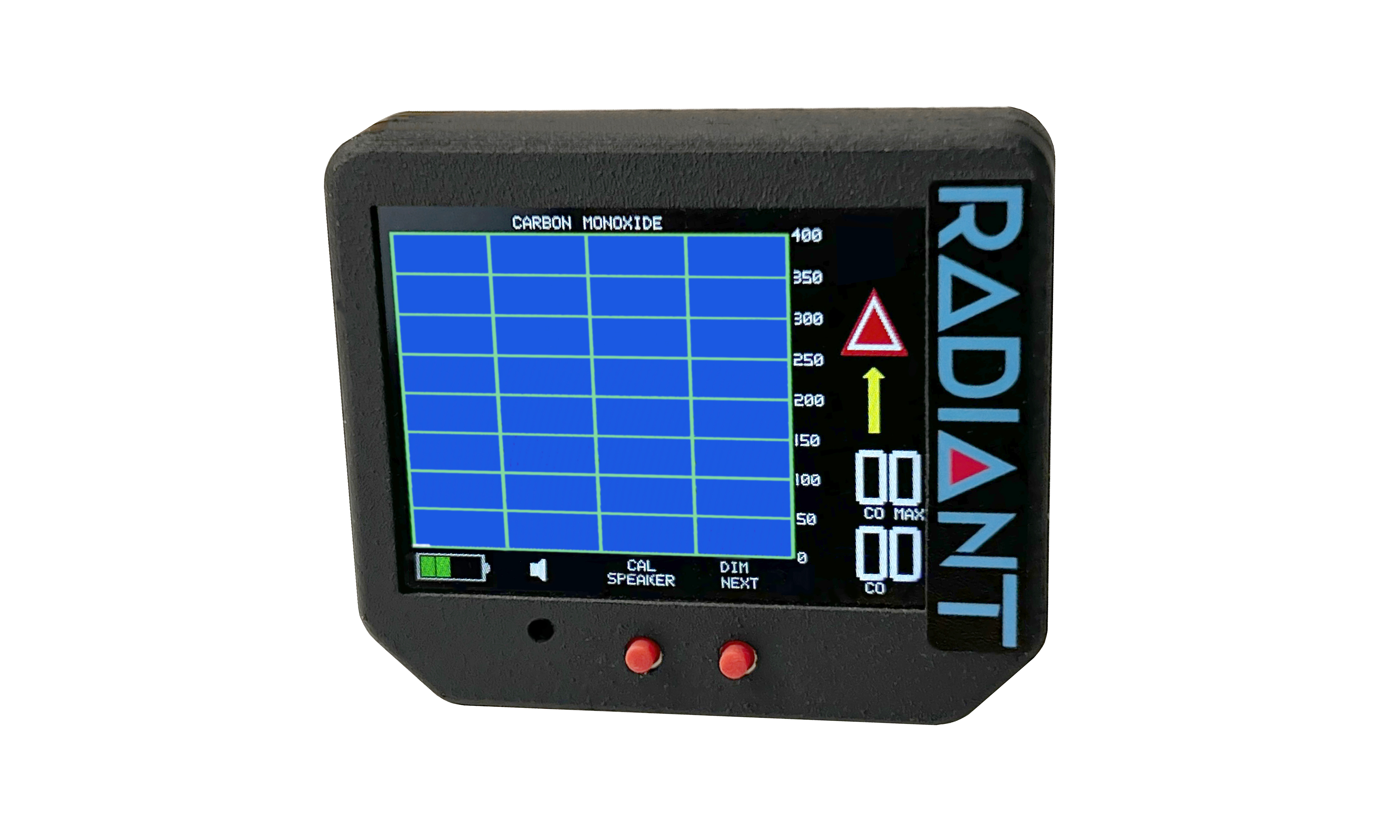
I chose a full color screen instead. This allows warning information to be shown in several ways:
  • Graphing over time
  • Current PPM calculation which changes color and value as CO levels rise
  • Maximum PPM value which is also color coded
  • Arrow Alert points upwards when CO level is rising; it blinks and is color coded with yellow and red 
  • Hazard Alert illuminates at critical (100PPM) CO levels; it is presented as a standard red hazard icon.
  • Battery Level
  • Speaker on / off icon (for muting active aural alarms)
  • Screen is dimmable for nighttime use.
  • Aural alarm sounds when value is reached (default: 50 PPM)
The screen display is daylight readable, bright and clear.

h)  May the battery be replaced by the user?

If the CO detector uses a fixed (nonrechargeable) battery, it must be replaced as recommended by the manufacturer or when the battery is low, whichever occurs first.

If the CO detector has a rechargeable battery, then it must be recharged. How? For CO Pro, we provide a power only USB port, allowing the CO detector to be recharged.

Every time the power on the unit is turned on, I log a power cycle. This is briefly shown as the unit powers up. Radiant recommends the replacement of the rechargeable battery after 1000 cycles. 

The battery is accessed by removing a sticker and two screws.

i) After power up, how long until the CO detector is ready for use?

Some are nearly instantaneous; others take up to a couple of minutes. In the case of CO Pro, the turn on time is about 10 seconds. Due to the engineering of the unit including the aforementioned Always On circuitry, the unit does not require any heater warm up time. 

j) What about cross sensitivities to other gases?

The CO detector manufacturer should be able to tell you what other gases the detector is sensitive to.

For CO Pro, the cross sensitivities are as follows:


This means that CO Pro reacts with Hydrogen, Carbon Monoxide, and very slightly to Alcohol.
 
k) What about secondary functions of the CO detectors?

Significantly, LightSpeed is selling headsets with built-in CO monitoring, and we are introducing CO Pro with a secondary function as well: G-Meter. The thought process behind this was fairly simple, and was approached from a marketing perspective. Since the CO detector normally is doing very little (reporting continuously @ 0 PPM CO), why not make a useful secondary function? I did this by including the G-Meter. Most aircraft do not have one; most pilots and some passengers want to know how strong the bumps were. The G-Meter is presented in a classic dial format:
The CO levels are shown continuously on the G-Meter screen. Should CO levels rise, CO Pro switches automatically back to the CO graphing screen.

Summary of Use and Design Factors in CO Detectors

I have reviewed the FAA and NTSB guidance and provided links to their documents. The NTSB recommends the use of a CO detector in aircraft.

I have asked these critical questions:

a)  Does the sensor within a CO detector degrade over time, and if so, what is some data thereto?
b)  Are their conditions which would adversely affect the sensor, and if so, what are they?
c)  Does the CO detector allow in situ recalibration for overall sensor changes (degradation) over years of time?  
d)  Does the CO detector allow for immediate recalibration related to zeroing?
e)  Does the useful life of the baseline sensor extend beyond 5 years?
f)  Is there a service life history of the part and / or our product which verifies these assertions?
g) Does the unit provide a visual and aural alert?  If so, what does the alerts entail?
h) May the battery be replaced by the user?
i) After power up, how long until the CO detector is ready for use?
j) What about cross sensitivities to other gases?
k) What about secondary functions of the CO detectors?

And I have provided answers as it relates to any detector, or more specifically the design of CO Pro, a CO detector from Radiant Instruments. 

If you have questions or background material which you believed I've missed, please drop me an email.

I hope you've enjoyed the read.


Thursday, December 8, 2022

My new Carbon Monoxide sensor has superb pilot friendly features!

 Hi!

We're announcing our new CO ProTM carbon monoxide sensor. It is designed by a pilot (me!!!) for pilots and passengers and travelers and has features I've always wanted in a Carbon Monoxide detector. 

Startup Screen on CO Pro

Without much of a drumroll, here's a list of features:

  • Five year sensor life; possibly extendible as field experience warrants
  • Always On sensor -- useful CO baseline Zero reading in about 15 seconds 
  • Rechargeable battery operation via USB power port 
  • 5 hour life in Bright
  • 10+ hours of operation in Dim mode
  • Aural Alarm which may be muted (touch the SPEAKER button)
  • Zero Recalibration on demand at the touch of a button (touch the CAL button for 3 seconds)
  • 0 to 600 PPM range; 50 PPM denoted in yellow and 100 PPM in red
  • Arrow Trend provides visual and aural warning when CO starts to rise, long before final value is settled
  • Graphing of CO levels over a two minute period; wraps around to show more information
  • Hazard Icon illuminates @ 100PPM and higher
  • Brilliant daylight readable color display
  • Bright mode for daylight and dim mode for nighttime (touch the DIM button for 3 seconds)
  • G-Meter as secondary function (touch the NEXT button briefly and unit will switch modes)
  • G-Meter has current, max and min digital values
  • G-Meter has standard dial indication as well
  • G-Meter has 'Ghosting' feature which shows G history
  • G-Meter mode also displays digital CO values even while G-Meter is active
  • When used in G-Meter mode, will automatically switch back to CO Graphing mode if CO levels start to rise
We also have another CO sensor which is called GEIGER CO.  

In its own right, the older GEIGER CO is a phenomenal product. Here's a photo of the GEIGER CO (orange metal) next to a CO PRO (black nylon with chopped carbon fiber case)


GEIGER CO and the new CO Pro, side by side

I tested GEIGER CO alongside the new CO Pro and uploaded the resulting video to YouTube.

You can see the video here:  https://youtu.be/aJz5FH31_2o

I am getting over a cold as I recorded that.  I hope you like my robust voice. :-)

Here's a look at the screen of CO Pro during a Carbon Monoxide event:
CO Pro screen during operation.  Note Hazard Icon (indicates +100PPM) and Graphing.
  
Here's a little bit of what's happening in this screen.
  • The graph shows a wrapped history of what has happened.
  • The Hazard Icon is on; it turns on whenever CO PPM > 100 PPM. 
  • The current CO reading is 194.
  • The max experienced CO was 212.
  • The battery icon shows 3 bars.
  • The speaker icon is visible. Whenever CO > 50 ppm the speaker alarm turns on.  We can clear it with the SPEAKER button.
Here's the G-Meter screen.

CO Pro screen during operation, in G-Meter mode

  • The Needle shows the current G's (about 1.02 as also shown digitally).
  • The 'Ghosting' effect shows needle history.
  • Also shown are MAX and MIN g values.
  • Below the thin line on the digital value list is CO Max and CO current level. Both are updated while using this as a G-Meter.
  • If the unit senses a rising CO level, it will automatically switch to CO graphing mode.

The CO Pro can be mounted with the optional Holster. It is designed for a standard 3 1/8" instrument cutout.


CO Pro shown mounted in optional holster

It can also be mounted to any flat surface using the corner holes.  Rivets; screws; Duct Tape (hint, hint).

Please order the CO Pro (or the GEIGER CO) now.

The pricing and availability are as follows:

CO Pro -- $199 intro offer through the end of the month & year (December 2022).

Optional Holster -- $39 intro offer through the end of the month & year (December 2022). I wish I could include this at no charge, but I can't.  We print them on our $20,000 MarkForged 3D printer and it takes more than one hour of print time.  Also, it is printed using nylon / chopped carbon fiber.  It is an exceptionally high quality print.

Aircraft Spruce has ordered CO Pro inventory for stock and is participating in the intro offer.

Links for purchase are here:

Co Pro™ Carbon Monoxide Monitor – Radiant Technology (radiantinstruments.com)

Radiant Technology CO PRO ™ Carbon Monoxide Monitor + Digital G-Meter | Aircraft Spruce


Tuesday, October 18, 2022

How I ended up in the Emergency Room with a blood clot

I've had growing concerns over my bradycardia, which is simply a slow heart rate. It can produce fainting, and I've never fainted, but I don't want to.  

A few months ago, I asked my family physician to get a little more aggressive in helping me deal with bradycardia.  He made a referral to a heart doc which fit into my medical insurance plan.

And so, I got to wear a heart monitor for 24 hours.  It showed.... pretty much nothing, other than the usual mix of benign contractions common to many people.  For instance, google "Premature Ventricular Contractions".  My heart averaged 49 BPM for the 24 hour period.  Low, but not a problem, according to the heart doc.

He also scheduled me for a treadmill stress test.  I did it, and I thought I was pretty spectacular.  No problems from my side.  

After I'd returned home, I got a call from the nurse. She advised me that the Doc had seen something suspicious -- he wanted me to take the more detailed version of the same treadmill test, this time with nuclear dye in my blood and pre/post cardiac imaging.  OK, I was concerned now.  We scheduled and took the test.

A day later -- the Doc informs me that there is no significant blockage.  My anxiety fades away.

Four days later -- my elbow, close to the catheter injection site for the dye, gets very tender and starts to swell to magnificent proportions.  It hurts. It is tender. It is warm.  Later, I take a pic of the elbow area:

The area of first trouble is obvious.

Two days after that -- with an unchanged elbow problem, I head to Urgent Care. It's Sunday around lunchtime, and the place is very unbusy.  weird....  The receptionist takes my quick info and schedules me for an appointment.  That's why no one is there.  Patients come in to urgent care, get assigned an appointment time, and leave to return at the appointed time.  Kathy and I do the same: we leave, eat lunch, and return.

When we return, the receptionist has us take a seat for a few minutes, and then advises me that I have an outstanding bill with the hospital.  I'm not sure what to do with the information that the institution that is giving me care first reminds me of financial obligations towards them.  That is so TREMENDOUSLY helpful in making me feel calm and collected.

I get into a room, then a PA comes and takes a quick look at the elbow. Without a great deal of consideration of the history of how I got this Big Bulging Elbow, she prescribes an antibiotic and sends me on my way.  My pleas to get alternative theories as to what is happening in my elbow fall on her very tired and deaf ears. 

Within two days, the swelling subsides, so I'm comfortable that the diagnosis was correct.

A week later, I'm still having symptoms.  Weirdly, some of my veins now feel hard and tender as they march up from my elbow towards my wrist.

Three weeks later, I'm still having symptoms.  The area of tenderness has rotated around the area below my wrist.

Five weeks later, I'm still having symptoms. I take a picture of my arm, marking off the progression of swelling and tenderness.  You can see areas one, two and three here:

A map of affected areas on my arm.

Six weeks later, I'm still having symptoms.  In fact, one of the veins crossing my wrist into my hand is now swollen and tender. That would be Area Four of this growing problem. My body starts to have general aches, like a cold.

One morning, I wake up and look at my left hand.  It is very swollen. My frustration of this situation has met a snapping point of sorts.  I take a photo of my two hands, showing the difference, and I write up a brief history and send it to my primary doc along with the photo.  (I do this using the online patient portal.) 

DVT-UE

The picture that (maybe) saved my life

Expecting nothing more than an appointment with the doc, instead, my phone rings.  It is the nurse. She tells me:  "Go to the ER. We're sending the same instruction to you via your patient portal." I'm stunned. I ask for some reasoning, but don't get a lot. I read the email from her in my patient portal, and it also says to go get emergency services. ??? It mentions a possible blood infection.

I walk around the corner to Kathy's home office, and tell her that we are heading to the ER.  She is as puzzled as I am; she can hardly believe it.

The experience at the ER takes five hours. 

So I'll cut to the chase: you already know that Emergency Rooms can be a hell hole of frustration, right?

They triage me in and assign me to an ultrasound of the arm.

That turns out to be a spot-on idea: the ultrasound reveals that I have a blood clot in a vein in my left arm. The NP discusses the chronology of events with me. I am once again struggling to understand how I have a blood clot.  What was the sequence of events? How did it start in my elbow and move towards my wrist?  More questions and assumptions than answers. The diagnosis is a Deep Vein Thrombosis in the Upper Extremity (DVT-UE), which is exceedingly rare. It also has a very high mortality rate. (Since I'm alive, diagnosed, and on appropriate medication, I assume I've dodged that bullet.)

Good news:  It's not occluded, or my hand would be the size of an orange.

Even better news:  a $500 per month drug will solve the problem if taken for a minimum of 3 months.

Even better better news:  the first month is free. The second month has a discount coupon.

I am advised to make a follow up appointment with my primary care physician on my ER discharge instructions. It says to see the doc within "1-2 days".  I call my doc's office the next morning:  first available date is 2 weeks away.  I indicate that I'm happy with that, but what about seeing them within 2 days, per the discharge instructions? The scheduler replies: "that's just a suggestion."

Bottom line:  I was trying to solve the bradycardia slow heart rate issues, and I ended up with a blood clot in my arm.  It's kind of like planning to go to the party, and you somehow end up in the sewer, floating downstream.

I'll try and be a little less bitter in my next post.  I'm currently on day six of Xarelto. I will be taking blood thinners for 3 months.

If you enjoyed reading this post, you should also read my prior post on FAA medical issues relating mostly to depression and anxiety. The link is here:

Standard Pilot Blog: Failing the Medical for emotional reasons? I had some anxiety about that too. (jameswiebe.blogspot.com)


Wednesday, September 21, 2022

Electronic Production Inflation Blues

I took nearly 3 weeks off. The time was spent communing with moose in Wyoming. Yeah, really, ran into 3 of the critters over the course of my camping trip.  One got very close to the blue chair that I was sitting in, and a few moments later I took this pic.

Nice lady, isn't she? She's a pretty big gal, and she's definitely looking at me. Defnitely looking bigger than I remember moose to be.

Which, of course, naturally leads me to my topic of inflation & a small electronic business. (Sorry for the abrupt turn.)

I've seen social media posts talking up a general mistrust in "supply chain issues", especially as it relates to electronics.  Such as electronics for automotive production, or in my case, experimental avionics. Some people mock the reality of these issues.

Here's my reality.

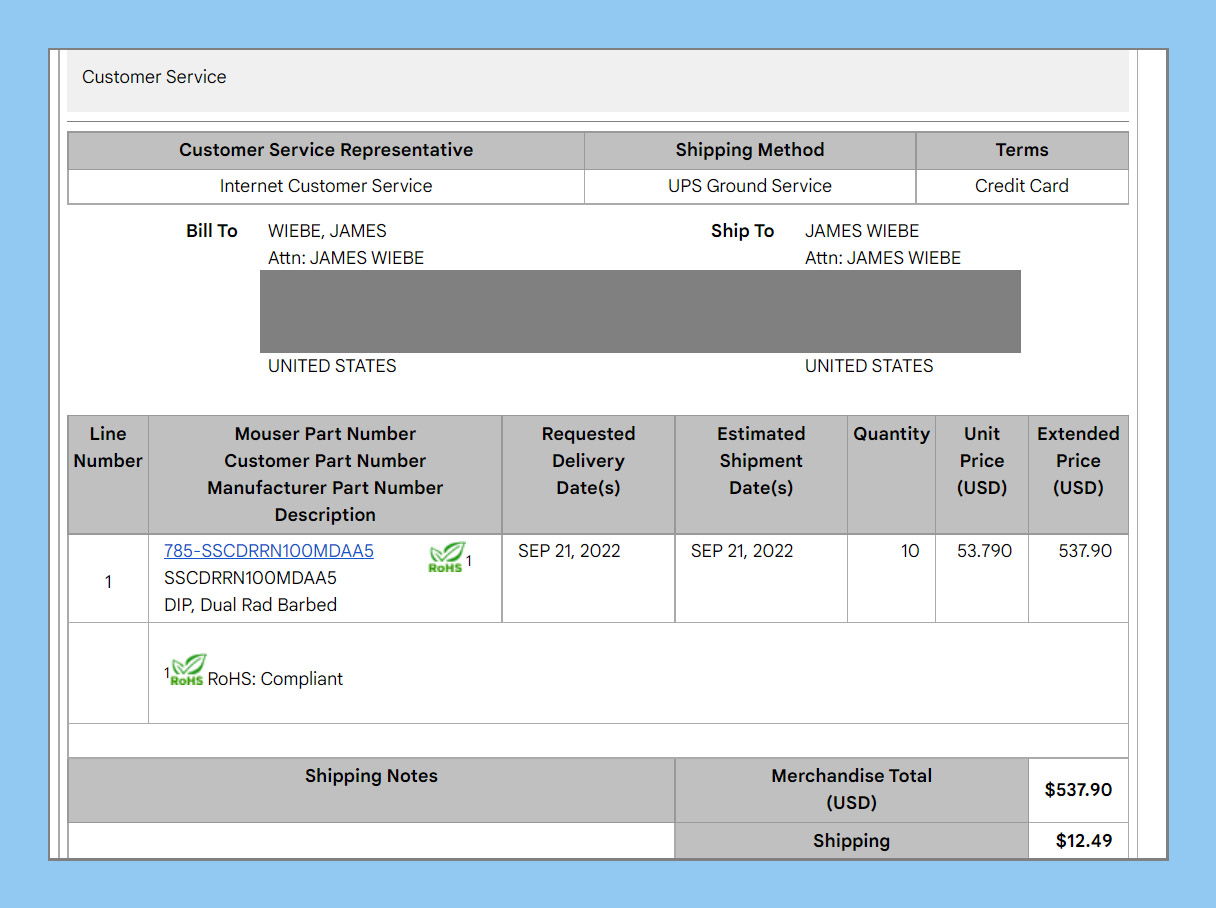
Around two years ago, I started using a very accurate air pressure sensor, as a basis for the air speed sensor within my line of aircraft instrumentation. Drilling down to the exact part in question, it is a Honeywell SSCDRRN100MDAA5.  It accepts a Pitot line (from the ram air) and also a static line (used to establish the differential pressure), thus providing a basis for digitization and eventual display of airspeed in the cockpit of the airplane.

Here is the invoice from two years ago:


And you can see that I paid $31.52 for each sensor.

Here's the invoice from today, as I bought parts to fill orders from customers.

Over the course of 24 months, the price has gone up from $31.52 to $53.79, an increase of 70% on this part. 

Yes, I bought less. And other electronic distributors are posting lower prices than Mouser, from whom I most recently ordered.  But the other distributors have zero stock.

You can see this for yourself by using the global chip finder which is:  FindChip.com, and inserting the part number SSCDRRN100MDAA5 into the search field.  Every part in the distribution system on the planet will show up.  Most distributors have zero stock; the ones that have parts have high prices.  Pick your poison: ship nothing and suffer; or buy parts and kill your margins.

Meanwhile, I have not passed any cost increases on to my channel or distributors. And I'm going to be the bad guy by eventually passing these increases on... except I'm not.  I'm just a small businessman trying to maintain margins, on average, across the board.

Which gets me to the bad news: The promotional prices for Radiant Instruments Gen-2 instruments ends at the end of September. Our older instrument product line will also go up in price starting October 1.  As of this writing, Aircraft Spruce has placed some orders at lower prices, and so they will be receiving some stock of our classic instruments (for instance, Radiant Turn Coordinator) and will be able to honor older pricing while their inventory holds together.  You can always find out what's in stock at Aircraft Spruce by searching Radiant in their website search bar. Most of our product line comes up, and things that are in stock are identified.

Arrgh.

Back to production tasks, now.  I promised Kathy that we would ship some orders tomorrow. 

...Hoping to repair the gross margins next month as prices go up. Hoping people still buy my stuff.

Best Regards,


Saturday, January 8, 2022

Details on Ultralight Honeycomb Cabin

I'm now 34 hours into the build of a Chipper ProCub / UltraCub 2022 prototype aircraft. The design has the following characteristics:
  • Safety first, with an enclosed robust cabin
  • Compliant with FAR Part 103
  •     - single seat
  •     - empty weight of 254 pounds
  •     - stall speed of 28 mph or less
  •     - full power cruise speed of no greater than 62 mph
  •     - maximum fuel capacity of 5 gallons
  • Easy to build
  • Classic good looks, unapologetically an airplane 
  • Inexpensive
  • Quick building
  • Folding wings
  • Fantastic flying manners
  • STOL capability is a plus.
 A shoutout to my friend Landon!, who painted the seat in the photo. This seat was made for and first flown in my skydock design, and it looks great with the old Belite logo and gloss blue color. Everytime I do work on an ultralight, I find this seat and set it in the design to see how things are shaping up. I do have a list of brief skydock videos,


but I digress. Back to the business at hand. Here's the visual progress report on this Saturday:


Below is a closeup on that seat. It is resting on two honeycomb bulkheads, along with the backrest honeycomb cross piece. The honeycomb has been cleaned up with an aluminum cap on the heavier 3/4" rear bottom honeycomb and backrest cross piece. The front cross piece has a vinyl cap. Look carefully into the small 'windows' in the sides of the cabin, and you can see where I've begun to install aluminum tape over exposed honeycomb.


Another photographic point of view. The cabin is currently in 'flintstone' mode as the bottom skins aren't yet installed.


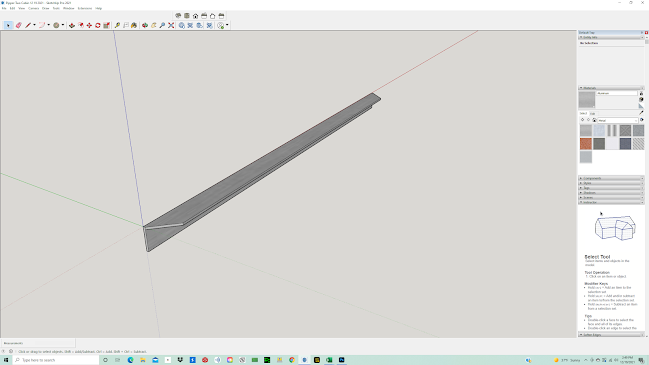
Yesterday, I designed a couple of new gussets for the top of the cabin. They are highlighted in green:


Today, I cut them on the shopbot and installed them. Here's the forward gusset. You can see the mirror part on the opposite side of the cabin as well. I pre-primed them before I installed them. The tab is intentionally overbent to keep the sharp edge away from the pilot-occupant.


For that matter, all of the gussets are bent with safety in mind. The tabs almost always face away from the occupant.

I already mentioned the backrest cross support piece. It is fabricated from 3/4" honeycomb, and then held in place by pairs of aluminum angles which were bonded using epoxy. I prefer 3m 2216, but I had original formula JB Weld on hand, so I used it.


The photo shows the parts bonded together and held with temporary bolts. As the rear fuselage side skin is not yet installed, these bolts will eventually be replaced and redone with washers along normal practice lines.


Changing my focus to the front box, I'm really pleased with the quality of the CNC parts; the general fit, and the way this is beginning to look. I'm excited for how things will be when the windshield and engine cowl are added. I'm designing a new cowl which reflects the fresh new look of this airplane; I won't be using the old radial bump design anymore.


I mentioned earlier that the cabin was still in flintstone mode (no bottom skin yet); these photos show the detail of the structure as seen from the bottom.


Make sure you've seen my youtube videos which show this evolving project:

This one talks about adding metal skin to the rear fuselage in CAD:

This one talks about using Sketchup to make this design:

Finally, as I am in bootstrap mode, I get a lot of enthusiasm and deeply appreciate my patrons. $10 per month gives you the rights to the blueprints for this plane (terms and conditions apply) and $35 per month indicates that you plan to purchase a kit. $80 indicates that you plan to purchase a Ready To Fly; I've set the price for the first 3 RTF planes at $30,000 in taildragger configuration and basic instrumentation.

Become a patron here:

www.patreon.com/jameswiebe

Thanks for reading,


P.S., this is how the cabin CAD looked on December 12, a little less than one month ago. It's come a long way!


Wednesday, January 5, 2022

Honeycomb Ultralight Cabin

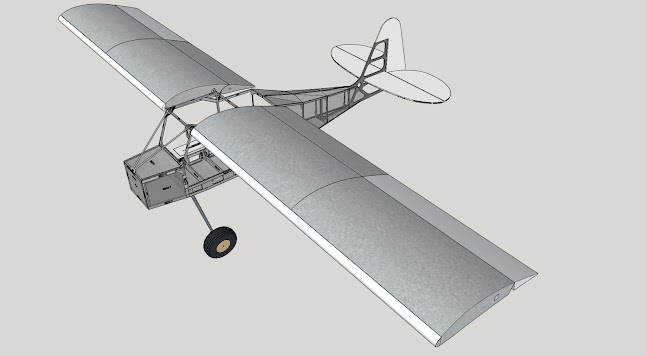
The last two days have been spent starting to put together my ultralight kit aircraft. I'm pleased with my progress; I currently have 19 hours in the build. When finished, my Chipper UltraCub will look a lot like this:

Yeah, you have to use some imagination to make that real plane. An engine would help. Also, a propeller, a windshield, a coat of paint, and some control systems.

My efforts this week are focused on the cabin and rear fuselage. Drum roll, please... here's some photos at the end of today, Wednesday.

What you are looking at is a cabin which is very similar to earlier ProCubs and UltraCubs from Belite Aircraft. Structurally, it is built from honeycomb aluminum and a lot of sheet metal.  The honeycomb is used very smartly, using pre-cut strips, so very little is wasted.

I am providing the plans for this ultralight to my Patreon subscribers for $10 / month. Terms & Conditions apply.  Here's the link: www.patreon.com/jameswiebe  You can also indicate your desire to purchase a kit for $35 / month. I need the support, and I appreciate it very much.

Looking inside the cabin from the rear, here's the view:


And here's another view.


The main idea in this design is to surround the pilot with a cage, constructured of honeycomb and extruded aluminum, so that the occupant is well protected in the event of an accident. The size features are similar to my past commercial designs, a tall person will fit well, and a big person will fit as well. 

The exterior width is 25", and I am 6' 2"+. 

For example, the firewall frame is constructed from 3/4" thick honeycomb. These pieces are brute strong, yet very light. This is 12 ounces of honeycomb:


I used my shopbot to cut various gussets, providing exact fit and awesome quality. Here's some samples.


The most impressive gusset so far in this project is the side gusset. It ties together the forward cabin, a lot of honeycomb, and the rear fuselage while weight very little and providing predrilled holes for easy assembly. It's nice.


I'm also using stock aluminum structural angle, which requires hand drilling. Here, I've marked a part with a drill pattern.

You can see that part attached to a bulkhead, in the below photo. Also note how my predrilled angles have been used to attach the bulkhead to side honeycomb.


As I indicated before, I am providing the plans for this ultralight design to my Patreon subscribers for $10 / month. Terms & Conditions apply.  Here's the link: www.patreon.com/jameswiebe  You can also indicate your desire to purchase a kit for $35 / month. I need your patreon support, and I appreciate it very much!!!

The most requested feature is folding wings. Naturally, this design has wings that fold.


Monday, December 27, 2021

Service Bulletin #5 Correct Wheel Alignment

 Service Bulletin #5 Correct Wheel Alignment

This SB #5 is advisory in nature.

When assembling landing gear, particularly wheel assembly, take care to ensure that alignment of the wheels is correct. The lineup of the wheel should be straight to ground travel path; toe-in and toe-out must be avoided. Toe-in will cause landing gear chatter.

Alignment is ensured by correct rotation of the landing gear shaft before pinning in place at the upper bulkhead fitting.

The following picture shows correct alignment. The green line denotes the vector of the ground roll relative to the tire.


The following picture shows incorrect alignment, which causes minor to severe gear chatter on takeoff and landing. The orange line is as incorrectly assembled; the green line is what it must be reset to.


Tuesday, December 21, 2021

James launches a Podcast!

In this age of social media, I'm loving the way that I can connect my passion for aircraft with you!

I've been doing this in multiple ways: this blog, Facebook, email communication, patreon, Youtube, instagram, and now... drum roll please... an occasional podcast.

Well, it's really more like a video podcast. 

In yesterday's very first episode, I explain some of the design decisions behind the Chipper ProCub / UltraCub, along with a tour of some of the FAR Part 103 features that the design has.

You can see and hear it on YouTube, here:

https://youtu.be/iBtjWFirmBA

You also get to see my messy office.

I'm looking for ideas of topics you'd like me to cover. I'm looking for feedback on how to as interesting as I can for you!


Sunday, December 19, 2021

Mandatory Service Bulletin #4 - Installation of stronger gear head bulkhead

Mandatory Service Bulletin #4

Supercedes MSB #1


The purpose of this MSB is improve the strength of the main gear head bulkhead, replacing the original 5.25" x 0.25" machined part with a solid, larger part.

The desired outcome is a bulkhead which will enlarge the footprint spread of the landing gear brackets, which reduces torque caused by landing stresses, and also allows for a greater distance for bolt holes to the edge of the bulkhead, reducing or eliminating the problem of cracking.

Also included is a much larger angle piece for each side, allowing for better transfer of landing gear loads into the side 1/8" aluminum pieces.

This MSB also contains directives for potting bolt locations within honeycomb, substantially improving strength. 

This MSB also contains directives for bonding metal surfaces such as angle and flat sheet, which will substantially improve the strength of connected components and provide improved longevity for the airframe over time and service cycles.

This MSB allows future use of the bulkhead for hard points such as floats, shock absorbers, ski's, under fuselage storage container.

This MSB is required prior to installation of shock absorbers, which will be required for a possible future Gross Weight Increase to 1320 pounds.

Estimated time to install: 60 hours

Review and understand ALL INSTRUCTIONS prior to performing any work. As an example of one possible sequence error, potting of honeycomb for bolt installation is mandatory and must be performed prior to assembly. Without reviewing this material first, you may find it difficult to pot your honeycomb in sequence.

Supplied Materials:

1) this MSB manual, complete with large printed illustrations

2) 41" x 6" x 0.25" 6061T6 aluminum bar, solid

3) 41" x 2" x 2" x 0.188" 6061T6 aluminum angle, cut with dogleg angles at each end

4) 6" x 3" x 2" x 0.188" 6061T6 aluminum angle, cut to shape and pre-drilled (advise if you do not want it drilled)

5) 2" x 2" x 24" x 0.040" 6061T6 aluminum angle, bent to shape and predrilled with rivet location holes

6) AN nuts, washers, bolt kit

7) 1" aluminum square tube, separately used to actuate flaps (not a part of this MSB, but missing from many kits).

Needed but not included:

1) scrap material: honeycomb aluminum

2) bonding adhesive, such as 3M 2216

3) rivets

4) 80 grit sandpaper

5) acetone

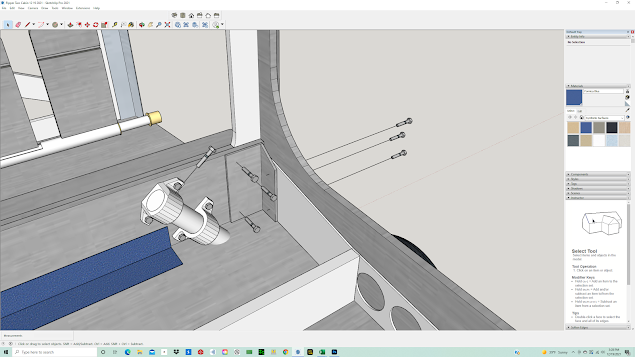
The original design is similar to the following CAD illustration, where the main gear bulkhead has lightening holes. Other details within this CAD illustration are not consistent with shipped kits.


Remove existing structure and test fit solid cross bar. 

Roughen surface of aluminum and of facing honeycomb with 80 grit. Clean with acetone or similar. Bond with adhesive and consistent pressure.


Cut a scrap of aluminum honeycomb to fit in the reverse top gap, sand, clean and bond as well.


Reverse side showing scrap honeycomb bonded in place.


The 2" x 2" x 3/16" angle piece looks like this:


And it is also prepped for bonding on the facing surface.  Bond it in place:


The 3" x 2" x 6" angles come pre-cut, as shown. Also pre-drilled. Please advise if you do not want them pre-drilled (for instance, to match existing hole locations at assembly).


Surface prep them by sanding and cleaning, then bond in position with adhesive and clamps. Do not crush honeycomb when clamping.

The bottom angle is constructed of .040 6061-T4 aluminum and is pre-bent and predrilled. Surface prep, bond in place, then rivet in place.


Bolt locations going through honeycomb must be potted with epoxy prior to bolting. The six bolts going through the corner angle are AN4.


(Anecdote: also shown is the recommended location for the AN3 shear twist bolt, going into the top landing gear bracket.)

The exact location of the landing gear brackets is provided in the final document accompanying your upgrade kit.


Two AN4 bolts are installed into the top, spaced 13" apart and 0.75" below the top line.

The center stick support is installed. Note the bend in the support and shimming as necessary for exact, friction-free, and backlash free use of the stick.


Drill and route fuel lines, rudder cables, etc., as required for your unique installation.